


What we will achieve:

For this, we must create our Header template with Elementor and configure the Sticky Top:

You must also add the header class to your section containing the menu.
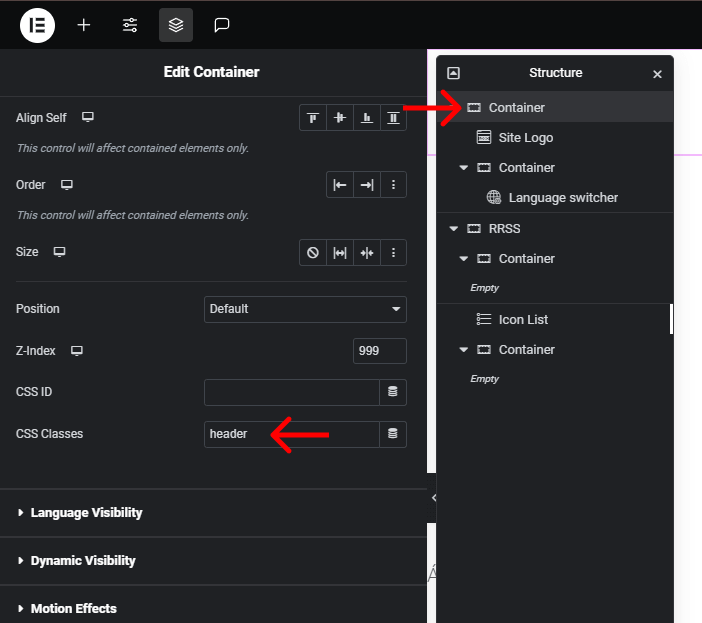
Then we are going to add the CSS styles in the style .css stylesheet:
					.header {
	transition: .6s !important;
	min-width: 100% !important;
}

.header.scrolled {
	background: #0A0A0A; /*o el color que quieras*/
}
Now we add some important libraries in our function.php
Probably in your theme you already have the function that calls the css and js sheets, so, if that’s the case, just add lines 6 and 7 to your function.
Libraries should always be called before your js sheet where the code that does the magic will be.
					// AGREGAR CUTOM JS/CSS
function add_scripts_proyecto() {

	$rand = rand(0, 999999999);

	wp_enqueue_script( 'script_gsap', '//cdnjs.cloudflare.com/ajax/libs/gsap/3.12.2/gsap.min.js', array ( 'jquery' ));
	wp_enqueue_script( 'script_gsapscroll', '//cdnjs.cloudflare.com/ajax/libs/gsap/3.12.2/ScrollTrigger.min.js', array ( 'jquery' ));
	wp_enqueue_script( 'script_custom', get_stylesheet_directory_uri() . '/custom.js', array ( 'jquery' ), $rand);

	// CSS
    wp_enqueue_style( 'chld_thm_cfg_child', trailingslashit( get_stylesheet_directory_uri() ) . 'style.css', array( 'hello-elementor','hello-elementor','hello-elementor-theme-style' ), $rand );

    wp_localize_script( 'script_custom', 'proyecto', [
        'is_mobile' => intval( wp_is_mobile() ),
    ]);
}
add_action( 'wp_enqueue_scripts', 'add_scripts_proyecto' );
Now we add the JS in the javascrip sheet you are using:
					$(window).on('load', function() {
		setTimeout(function() {
			scrollHeaderToggle();
		}, 1000)
	})

function scrollHeaderToggle() {
		let lastScrollTop = 0;
		const header = document.querySelector('.elementor-sticky.header');

		const height = header.offsetHeight + 10;
		window.addEventListener('scroll', function () {
			let st = window.pageYOffset || document.documentElement.scrollTop;

			// Check if the page is scrolled
			if (st > 0) {
				// Add a class when scrolled
				header.classList.add('scrolled');
			} else {
				// Remove the class when at the top
				header.classList.remove('scrolled');
			}

			// Check scroll direction
			if (st > lastScrollTop) {
				header.style.top = -height + 'px';
			} else {
				header.style.top = '0';
			}

			lastScrollTop = st;
		});

		window.dispatchEvent(new CustomEvent('scroll'))
}
And that’s it!